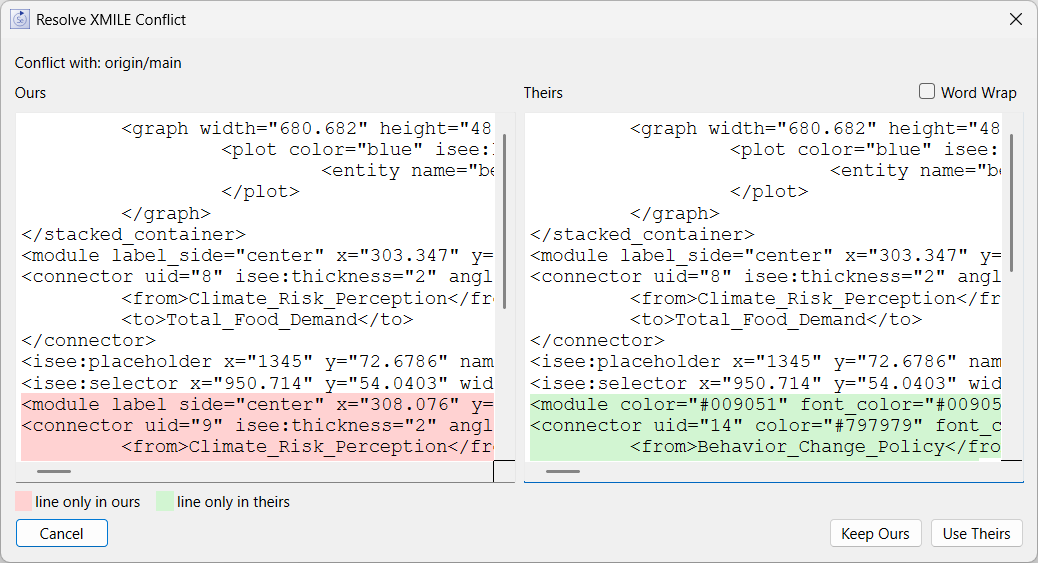
This dialog will appear when you open a model that has a git merge conflict. This can happen when you are using git to manage model versions. Inside of the .stmx file there will be entries like:
<<<<<<< HEAD
<product version="4.0" isee:build_number="3710" isee:saved_by_v1="true" lang="en">Stella Architect</product>
=======
<product version="4.2" isee:build_number="3866" isee:saved_by_v1="true" lang="en">Stella Architect</product>
>>>>>>> origin/main
Since this is not valid XML, Stella will not be able to open the file. However, instead of simply failing, Stella will look for this type of entry and try to resolve the conflicts.
Some conflicts, such as the one above, are unimportant and can be resolved by taking either version of the lines. If Stella determines the conflict is unimportant, it will simply take the first possibility and silently move to the next conflict. When it does not recognize the conflict as unimportant it will put up a dialog box:
The top line which show you what your current copy is in conflict with - in this case origin/main.
Then at the top of both lists is the common content just before the conflict the set context. This is not highlighted.
The left window display content in the current working copy of the file - highlighted in pink as only in ours. The right window shows the content from the remote bran